
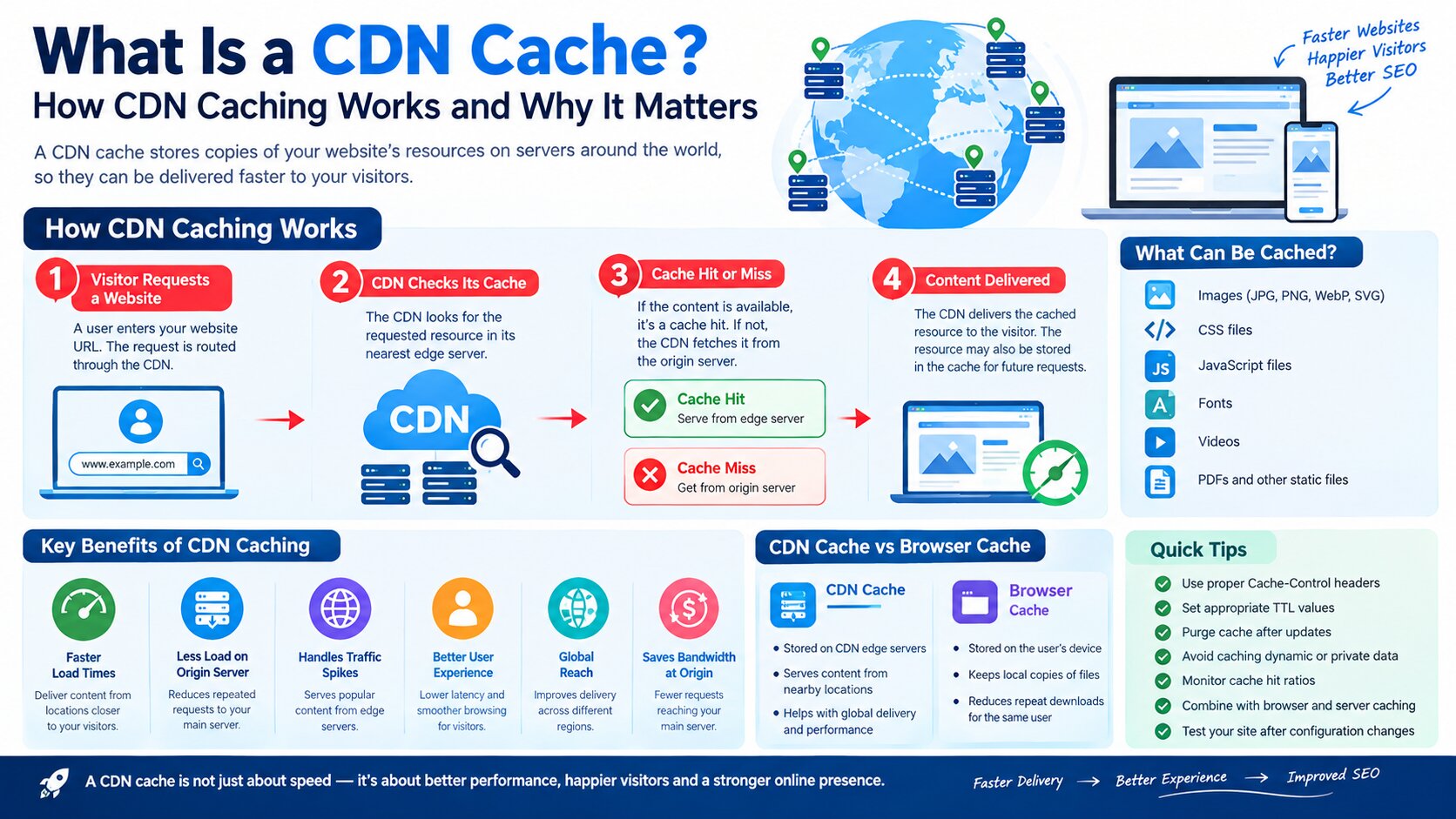
What Is a CDN Cache? How CDN Caching Works and Why It Matters
Website speed is an important part of providing a good user experience. When visitors request a webpage, images, JavaScript files, CSS files, videos, or other resources, those files need to travel from a server to the visitor’s device.
If the visitor is located far away from the website’s main server, this process can take longer.
This is where a CDN cache can help.
A CDN cache stores copies of website resources on servers distributed across different geographic locations. When a visitor requests a cached resource, the CDN can often deliver it from a server that is closer to the visitor instead of sending the request all the way to the website’s original server.
In simple terms, a CDN cache keeps frequently requested website files closer to users so they can be delivered faster.
CDN caching can improve website loading speed, reduce the workload on the origin server, and help websites handle traffic more efficiently.
This guide on UAESEO.agency explains what a CDN cache is, how CDN caching works, the different types of cached content, CDN cache benefits, cache control, cache clearing, common problems, and how CDN caching can affect SEO and website performance.
What Is a CDN Cache?
A CDN cache is temporary storage used by a Content Delivery Network (CDN) to keep copies of website resources closer to users.
CDN stands for Content Delivery Network.
A CDN consists of servers located in different geographic regions. These servers are commonly called edge servers or edge locations.
When a user visits a website, the CDN determines whether the requested resource is already available in its cache.
If it is cached, the CDN can serve the resource directly from the edge server.
For example, imagine that your website’s main server is located in the United States, but a visitor accesses your website from the UAE.
Without a CDN, the visitor’s request may need to travel to the origin server in the United States.
With a CDN, a cached image, CSS file, JavaScript file, or other static resource may already be available at an edge location closer to the UAE.
The CDN can then deliver that cached resource from the nearby location.
This can reduce latency and improve the time it takes for resources to reach the visitor.
What Is CDN Caching?
CDN caching is the process of storing copies of website resources on CDN edge servers.
The goal is to avoid repeatedly requesting the same static resources from the origin server.
For example, suppose 10,000 people visit a page containing the same logo image.
Without caching, the origin server may have to repeatedly deliver that image.
With CDN caching, the CDN can store a copy of the image and serve it to subsequent visitors.
The origin server therefore does not need to deliver the same resource every time.
CDN caching is particularly useful for resources that do not change frequently.
Common examples include:
- Images
- CSS files
- JavaScript files
- Fonts
- PDFs
- Videos
- Website icons
- Static HTML pages, when configured appropriately
- Other publicly cacheable files
How Does a CDN Cache Work?
Understanding how a CDN cache works becomes easier when you look at a simple request.
Imagine a visitor opens:
example.com/about
The process can work like this:
Step 1: Visitor Requests the Website
The visitor enters the website address into their browser.
The request is routed through the CDN.
Step 2: CDN Checks Its Cache
The CDN checks whether the requested resource is already stored at the appropriate edge location.
Step 3: Cache Hit or Cache Miss
There are two primary possibilities.
A cache hit occurs when the requested resource is already available in the CDN cache.
A cache miss occurs when the resource is not currently available or cannot be served from the cache.
Step 4: CDN Serves the Content
If there is a cache hit, the CDN serves the cached resource to the visitor.
If there is a cache miss, the CDN typically requests the resource from the origin server.
Step 5: Resource May Be Cached
Depending on the CDN’s caching rules and HTTP headers, the CDN may store the response for future requests.
The next visitor requesting the same cacheable resource may receive it directly from the CDN.
This process can significantly reduce repeated requests to the origin server.
What Is a Cache Hit?
A cache hit occurs when a CDN already has the requested resource stored in its cache and can deliver it without contacting the origin server.
For example:
A visitor requests:
/images/company-logo.webp
The CDN checks its cache and finds the file.
The CDN delivers the cached image.
This is a cache hit.
Cache hits are generally desirable because they reduce the need to contact the origin server.
What Is a Cache Miss?
A cache miss occurs when the CDN does not have a usable cached version of the requested resource.
For example, a new image is uploaded to your website.
A visitor requests that image for the first time.
The CDN does not yet have the resource cached, so it requests the file from the origin server.
The CDN may then cache the response according to its configuration.
The next request may be served from the CDN cache.
CDN Cache vs Origin Server
The origin server is the main server where your website’s original content is hosted.
The CDN cache contains copies of resources that the CDN is allowed to cache.
Think of the origin server as the main warehouse and CDN edge servers as smaller local warehouses.
The main warehouse contains the original inventory.
The local warehouses keep commonly requested items closer to customers.
This reduces the distance and workload involved in delivering frequently requested resources.
What Can a CDN Cache?
CDNs are particularly effective for static resources.
Common cacheable resources include:
Images
Examples include:
- JPG
- PNG
- WebP
- AVIF
- SVG
Images can represent a significant portion of a webpage’s total file size, so delivering them efficiently can improve performance.
CSS Files
Stylesheets are often cached because they may be reused across many pages.
JavaScript Files
JavaScript resources can also be cached when the caching configuration allows it.
Fonts
Web fonts may be cached so returning visitors do not need to repeatedly download the same font files.
Videos
Large video files and other media can benefit from CDN delivery because edge servers can reduce the distance between the resource and the user.
PDFs and Other Static Files
Publicly accessible documents can also be cached depending on the CDN configuration.
Can a CDN Cache HTML Pages?
Yes, but HTML caching requires more careful configuration than caching static assets.
Caching HTML can provide substantial performance benefits, but websites often contain dynamic information.
For example, an ecommerce website might display:
- Shopping cart information
- Account details
- Personalized recommendations
- Login status
- Inventory information
- Location-specific content
Caching such pages incorrectly can result in users receiving outdated or inappropriate content.
For this reason, HTML caching rules should be designed carefully.
Static assets such as images, CSS, JavaScript, and fonts are generally easier to cache safely.
CDN Cache-Control
One of the most important concepts in CDN caching is Cache-Control.
Cache-Control is an HTTP response header that provides instructions about how content can be cached.
For example, a website can specify how long a resource should remain fresh.
A simplified example is:
Cache-Control: public, max-age=86400
This indicates that the resource can be publicly cached and can be considered fresh for a specified period.
The exact caching behavior depends on the CDN, server configuration, headers, and caching rules.
Other headers, such as Expires and ETag, can also participate in browser and caching behavior.
What Is TTL in CDN Caching?
TTL stands for Time to Live.
In CDN caching, TTL determines how long a cached resource can remain fresh before it needs to be revalidated or fetched again, depending on the configuration.
For example, you might configure:
- Images: long TTL
- CSS: long TTL
- JavaScript: long TTL
- Frequently changing HTML: short TTL
- Personalized content: bypass cache
The correct TTL depends on how frequently the content changes.
A logo that rarely changes can usually have a longer cache lifetime.
A frequently updated page may require a shorter cache duration.
Why Use a CDN Cache?
There are several important reasons websites use CDN caching.
1. Faster Content Delivery
A CDN can serve cached content from an edge location closer to the visitor.
This can reduce network latency.
2. Lower Origin Server Load
If the CDN serves cached resources, the origin server receives fewer repeated requests.
This can reduce server workload.
3. Better Handling of Traffic Spikes
Caching can help websites handle large numbers of requests for the same static resources.
For example, if a page suddenly becomes popular, cached assets can be delivered through the CDN instead of repeatedly being requested from the origin.
4. Better User Experience
Faster-loading pages generally provide a better browsing experience.
Visitors are less likely to wait for large resources to travel from a distant origin server.
5. Global Content Delivery
A CDN can help websites deliver resources more efficiently to visitors in different geographic regions.
This is particularly useful for websites serving international audiences.
6. Reduced Bandwidth Usage at the Origin
Because cached resources can be served by CDN edge servers, fewer requests need to reach the origin.
Depending on the hosting and CDN configuration, this can help reduce origin bandwidth consumption.
Does CDN Caching Improve SEO?
CDN caching can contribute to better website performance, which can indirectly support SEO.
However, a CDN is not a direct ranking shortcut.
Search engines evaluate many aspects of a website, and simply installing a CDN does not guarantee better rankings.
The main SEO benefit comes from improving technical performance and user experience.
A CDN may help with:
- Faster resource delivery
- Lower latency
- Better page performance
- More efficient handling of traffic
- Improved availability of static resources
But website owners should still focus on:
- High-quality content
- Search intent
- Technical SEO
- Mobile usability
- Internal linking
- Crawlability
- Indexing
- Core Web Vitals
- Website security
- Relevant backlinks
A CDN should therefore be considered part of a broader website performance strategy.
CDN Cache and Core Web Vitals
Website caching can contribute to improved performance, but CDN caching is only one part of optimizing Core Web Vitals.
For example, delivering CSS, JavaScript, fonts, and images efficiently can help reduce the time required to load important page resources.
However, poor JavaScript execution, oversized images, slow server responses, layout shifts, and other issues can still affect performance even when a CDN is installed.
A properly configured CDN should therefore be combined with broader performance optimization.
CDN Cache vs Browser Cache
CDN caching and browser caching are related but different.
CDN Cache
A CDN cache stores resources on servers operated by the CDN across different locations.
Browser Cache
A browser cache stores resources locally on the visitor’s device.
For example, when a visitor loads your logo:
The CDN may provide the logo from an edge server.
The visitor’s browser may then store the logo locally.
When the visitor returns to the website, the browser may be able to use its local copy instead of downloading it again.
Using both caching methods effectively can reduce unnecessary downloads.
CDN Cache vs Website Cache
A website may have several different caching layers.
For example:
Browser cache → CDN cache → website/server cache → database
Each layer has a different purpose.
A WordPress website might use a caching plugin to generate or store optimized page resources.
A CDN can then distribute cacheable content through edge locations.
The visitor’s browser can also cache resources locally.
When these layers are configured correctly, they can work together to improve performance.
What Happens When You Update a Website?
One of the most common CDN caching problems happens after a website update.
Imagine you replace:
logo.png
with a new version.
The origin server contains the new image, but the CDN may still have the old image cached.
Visitors may therefore continue seeing the previous version.
This happens because the CDN cache has not yet expired or been purged.
There are several ways to handle this problem.
How to Clear a CDN Cache
Clearing a CDN cache is commonly called cache purging or cache invalidation.
The exact process depends on the CDN provider.
A typical process looks like this:
Step 1: Log In to Your CDN
Open your CDN management dashboard.
Step 2: Find Cache Settings
Look for a section such as Cache, Caching, Cache Rules, or Cache Management.
Step 3: Choose Purge or Clear Cache
Select the option for removing cached content.
Step 4: Choose What to Purge
Some systems allow you to purge:
- A single URL
- A group of URLs
- A cache tag
- A specific asset
- The entire cache
Step 5: Test the Updated Website
After purging, open the website again and verify that the latest content is being delivered.
Avoid unnecessarily purging the entire cache after every small update if your CDN supports more targeted invalidation.
Why Is My Website Showing Old Content After a CDN Update?
If visitors continue seeing old content, several caching layers may be involved.
Check:
- Browser cache
- CDN cache
- WordPress caching plugin
- Server cache
- Reverse proxy cache
- Application cache
For example, you may clear the CDN cache but still have an old version stored by a WordPress caching plugin.
Alternatively, the CDN may correctly serve a fresh file while the browser continues using an older cached copy.
It is important to identify which caching layer contains the outdated resource.
Common CDN Cache Problems
Old Content Appearing
This is one of the most common problems.
The solution may involve cache purging, shorter TTL settings, or improved cache invalidation.
Changes Not Appearing Immediately
A resource may continue being served from cache until its cache lifetime expires.
Incorrect HTML Caching
Caching dynamic HTML incorrectly can cause users to see outdated or personalized content belonging to another session.
Cache Rules Are Too Aggressive
Caching everything may create problems for login pages, shopping carts, dashboards, checkout pages, and other dynamic areas.
Cache Rules Are Too Conservative
If almost nothing is cached, the CDN may provide little performance benefit.
Multiple Caching Layers Conflict
Browser, CDN, server, and application caches can sometimes make troubleshooting difficult.
How to Configure CDN Caching Properly
A good CDN caching strategy starts by identifying which resources change frequently and which remain stable.
Long Cache Lifetimes
Consider longer caching periods for resources that rarely change, such as:
- Logos
- Fonts
- Static images
- Versioned CSS
- Versioned JavaScript
Shorter Cache Lifetimes
Frequently changing resources may need shorter cache periods.
Examples include:
- Frequently updated HTML
- News content
- Inventory information
- Dynamic API responses
Bypass Dynamic Content
Sensitive or personalized resources generally need careful cache bypass rules.
Examples can include:
- Login pages
- Account dashboards
- Checkout pages
- Private user information
- Personalized responses
The exact configuration depends on your website architecture and CDN.
Cache Busting and Versioned Files
A common way to prevent visitors from receiving an outdated CSS or JavaScript file is to use versioned filenames or URLs.
For example:
style.css
could become:
style.v2.css
Or the URL can contain a version parameter, depending on the site’s configuration.
When the URL changes, the CDN treats it as a different resource.
This allows the new file to be requested while older cached versions can remain available until they expire.
This technique is often called cache busting.
CDN Caching for WordPress Websites
CDN caching can be particularly useful for WordPress websites.
A typical WordPress website may contain many cacheable resources, including:
- Images
- CSS
- JavaScript
- Fonts
- Static files
- Public pages
However, WordPress also contains dynamic functionality.
Examples include:
- WordPress admin
- Login pages
- Shopping carts
- Checkout pages
- User dashboards
- Personalized content
These areas should be handled carefully.
A common WordPress performance setup may include:
WordPress → server/page cache → CDN → visitor
The correct configuration depends on the hosting provider, CDN, plugins, and website architecture.
CDN Cache and Website Security
A CDN can provide security-related benefits depending on the service and configuration.
For example, some CDN providers offer features such as:
- DDoS protection
- Web application firewall capabilities
- Bot management
- Rate limiting
- TLS/HTTPS support
However, caching itself is primarily a performance and content-delivery mechanism.
Security controls and caching rules should be configured separately and carefully.
Never assume that putting a website behind a CDN automatically makes every part of the website secure.
How to Test if CDN Caching Is Working
You can check whether CDN caching is working by examining response headers and CDN analytics.
Depending on the provider, you may see headers indicating:
- Cache hit
- Cache miss
- Cache status
- Age
- Cache-control information
You can also compare response behavior before and after enabling the CDN.
A useful testing process is:
- Open the website.
- Inspect the requested resource.
- Check the response headers.
- Look for CDN cache information.
- Reload the resource.
- Compare the response behavior.
- Test from different locations when possible.
Remember that the first request may be a cache miss.
That does not necessarily mean the CDN is not working.
CDN Caching Best Practices
Follow these best practices when configuring CDN caching.
1. Cache Static Assets
Use CDN caching for resources that are safe to cache.
2. Use Appropriate TTLs
Set cache lifetimes according to how frequently content changes.
3. Avoid Caching Private Data
Do not accidentally cache personalized or sensitive responses.
4. Use Cache Invalidation
Have a clear process for removing outdated resources.
5. Version Frequently Updated Assets
Versioned files can make cache management easier.
6. Monitor Cache Performance
Check cache hit ratios, origin requests, errors, and performance metrics.
7. Test After Configuration Changes
Always verify that your website still works correctly after changing cache rules.
8. Don’t Cache Everything Automatically
More caching is not always better.
The goal is to cache the right resources safely.
CDN Cache Checklist
Before launching a CDN, review the following checklist:
- Identify cacheable resources
- Configure static asset caching
- Set appropriate TTL values
- Review Cache-Control headers
- Configure dynamic content bypasses
- Exclude private pages where necessary
- Create a cache purge process
- Consider asset versioning
- Test cache hits and misses
- Check website functionality
- Test login and checkout areas
- Monitor origin requests
- Review website performance
- Check for outdated content after updates
Frequently Asked Questions
What is a CDN cache in simple terms?
A CDN cache stores copies of website resources on servers located closer to website visitors. This allows frequently requested content to be delivered without always contacting the website’s main server.
What does CDN caching do?
CDN caching stores cacheable website resources at CDN edge locations. When a visitor requests those resources, the CDN may deliver them from the cached copy.
Is CDN cache the same as browser cache?
No. A CDN cache stores content on CDN servers, while browser cache stores content on the visitor’s device.
Does CDN caching make a website faster?
It can. By delivering cached resources from edge locations closer to visitors, a CDN can reduce latency and improve content delivery.
Does a CDN cache HTML?
Yes, HTML can be cached, but dynamic HTML requires careful configuration because pages may contain personalized or frequently changing information.
How long does CDN cache last?
It depends on the CDN configuration, HTTP cache headers, TTL settings, and caching rules. Different resources can have different cache lifetimes.
How do I clear CDN cache?
You normally clear it through your CDN provider’s dashboard using a cache purge or invalidation function. The exact process varies by provider.
Why does my website show old content after clearing the cache?
Old content may still exist in another caching layer, such as the browser, WordPress cache, server cache, or another proxy. Check all caching layers when troubleshooting.
Does CDN caching help SEO?
CDN caching can contribute to better website performance, which can support a better user experience. However, using a CDN does not guarantee higher search rankings.
Should every website use a CDN?
Not necessarily. A CDN can be especially useful for websites with visitors distributed across different geographic locations, large static assets, or significant traffic. The value depends on the site’s hosting, audience, architecture, and performance requirements.
Final Thoughts
A CDN cache is an important part of modern website performance. Instead of requiring every visitor to retrieve resources directly from the origin server, a Content Delivery Network can store copies of cacheable resources at edge locations and deliver them closer to users.
Understanding what a CDN cache is helps website owners make better decisions about caching, performance, and technical SEO.
The most important concepts to remember are cache hits, cache misses, TTL, Cache-Control, cache purging, cache invalidation, and cache bypass rules.
For most websites, static resources such as images, CSS, JavaScript, and fonts are good candidates for CDN caching. Dynamic and personalized content requires more careful handling.
CDN caching can also work together with browser caching, server caching, and WordPress caching to create a faster content-delivery system.
However, a CDN should not be treated as a complete SEO solution. Website owners should continue improving content quality, technical SEO, mobile performance, Core Web Vitals, internal linking, security, and overall user experience.
When configured correctly, CDN caching can reduce unnecessary origin-server requests, improve resource delivery, and provide a more efficient experience for visitors around the world.