Google Business Profile: Complete Guide to Google Business Profile Optimization
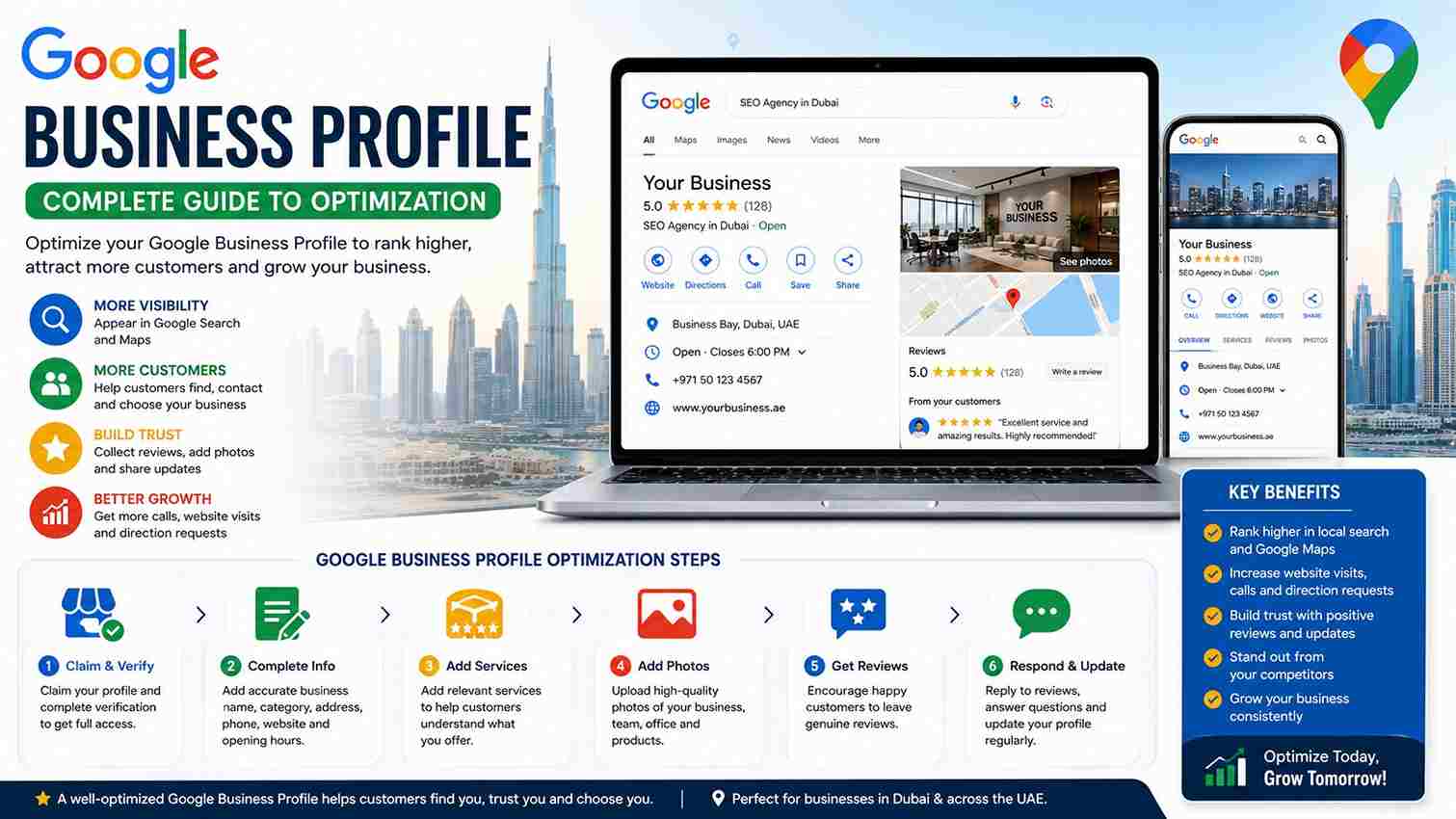
If you own a local business, one of the most important online assets you can manage is your Google Business Profile. It helps customers discover your business through Google Search and Google Maps, find your phone number and opening hours, visit your website, read reviews, view photos, and understand what your business offers.
For businesses in Dubai and across the UAE, having an accurate and properly optimized Business Profile can be particularly valuable because customers frequently search for nearby services, companies, shops, restaurants, and professionals before making a decision.
However, simply creating a Google Business Profile is not enough. Your profile needs to be complete, accurate, trustworthy, and regularly maintained.
This guide explains Google Business Profile optimization in simple language and provides practical steps you can use to improve your local search presence.
What Is a Google Business Profile?
Google Business Profile is a free Google tool that allows eligible businesses to manage how their business information appears on Google Search and Google Maps.
A verified profile can display information such as:
- Business name
- Business category
- Address
- Service area
- Phone number
- Website
- Opening hours
- Photos
- Reviews
- Products or services
- Business attributes
Google explains that a Business Profile helps customers find businesses on Search and Maps and allows businesses to interact with customers through reviews, photos, and other information.
Why Is Google Business Profile Important?
When someone searches for a local service, Google may display local businesses in Search or Maps.
For example, a customer might search for:
- SEO agency near me
- dentist in Dubai
- restaurant in Sharjah
- car repair shop near me
- WordPress developer in Dubai
A well-maintained Business Profile gives Google useful information about your business and makes it easier for potential customers to understand what you offer.
Google states that complete and accurate Business Profiles are more likely to appear in relevant local search results.
What Is Google Business Profile Optimization?
Google Business Profile optimization means improving your profile so that your business information is complete, accurate, relevant, and useful to customers.
Optimization can include:
- Verifying your business
- Choosing the correct primary category
- Adding relevant business information
- Maintaining accurate opening hours
- Adding appropriate services
- Uploading real business photos
- Managing customer reviews
- Keeping information updated
- Improving your website and local SEO
- Monitoring your profile performance
The objective should not be to manipulate Google. The objective is to provide Google and customers with accurate information about your real business.
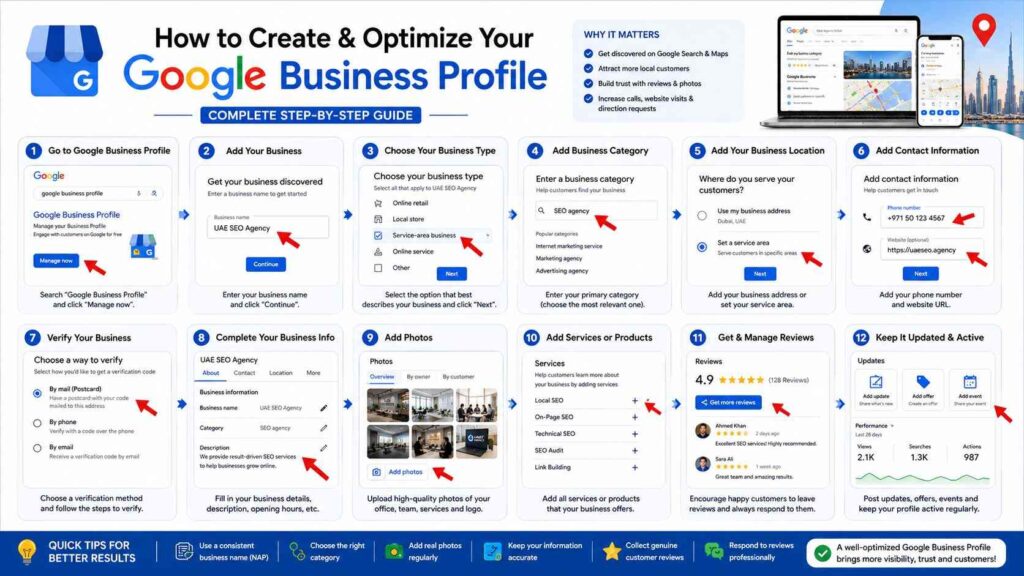
Step 1: Claim and Verify Your Business Profile
The first step is to claim your Business Profile and complete Google’s verification process.
Verification confirms that you’re authorized to manage the business profile. Google recommends verification because businesses need to add or claim and verify their profile to appear properly across Google services.
Without verification, some profile management features may not be available.
Step 2: Use Your Real Business Name
Your business name should accurately represent the name customers know your business by.
Avoid adding unnecessary keywords to your business name simply to try to rank higher.
For example, if your actual business is called “ABC Digital,” don’t change the profile name to something like:
ABC Digital Best SEO Company Dubai Cheap SEO Services
unless that is genuinely your real-world business name.
Keyword stuffing can make your profile look unnatural and may create problems.
Your goal should be consistency and accuracy.
Step 3: Select the Correct Business Category
Your primary category helps Google understand what your business does.
Choosing the most relevant category is an important part of Google Business Profile optimization.
For example, a business might be categorized as:
- SEO agency
- Restaurant
- Dentist
- Real estate agency
- Hotel
- Plumber
- Auto repair shop
Choose the category that most accurately represents your main business.
Do not select unrelated categories simply because you believe they have more searches.
Step 4: Complete Your Business Information
Complete as much relevant information as possible.
Depending on your business, this may include:
- Business address
- Service area
- Phone number
- Website
- Business hours
- Special hours
- Services
- Attributes
Google specifically recommends keeping business information complete and accurate because it helps customers understand what you do, where you are, and when they can visit.
Step 5: Keep Your Opening Hours Updated
Incorrect opening hours can create a poor customer experience.
Imagine a customer searches for your company, sees that you’re open, travels to your location, and discovers that you’re closed.
This can damage trust.
Update your profile when:
- Normal hours change
- Holidays affect opening times
- Ramadan schedules change
- Your business temporarily closes
- You have special operating hours
Keeping this information accurate is a simple but important optimization task.
Step 6: Add Relevant Services
If your business provides multiple services, make sure the relevant services are represented accurately in your Business Profile.
For an SEO agency, services might include:
- Local SEO
- Technical SEO
- On-page SEO
- SEO audits
- Link building
- Google Business Profile optimization
- WordPress SEO
For another type of business, the service list would be completely different.
Don’t add services you don’t actually provide.
Step 7: Add High-Quality Business Photos
Photos can help customers understand your business before they contact or visit you.
Depending on your business, consider adding:
- Exterior photos
- Interior photos
- Team photos
- Product photos
- Service photos
- Work examples
- Office photos
Google recommends clear, well-lit photos that accurately represent the business. Its current guidance recommends JPG or PNG images between 10 KB and 5 MB, with 720 × 720 pixels recommended and at least 250 × 250 pixels.
Don’t use heavily edited images that misrepresent your business.
Authentic photos are more useful to customers.
Step 8: Encourage Genuine Customer Reviews
Reviews are an important part of local business visibility and customer decision-making.
Google says reviews can help businesses stand out and provide useful information to potential customers.
Ask genuine customers to leave honest feedback after they have used your products or services.
However, don’t buy reviews or offer rewards in exchange for positive reviews.
Google specifically prohibits incentives such as free or discounted products or services in exchange for reviews, changing reviews, or removing negative reviews.
The safest approach is simple:
Provide excellent service and ask customers for honest feedback.
Step 9: Respond to Customer Reviews
Don’t just collect reviews—respond to them.
Responding shows customers that you value their feedback.
For positive reviews, thank the customer and mention something relevant about their experience.
For negative reviews:
- Stay professional
- Don’t argue
- Don’t insult the customer
- Acknowledge the concern
- Explain how you can help
- Take sensitive discussions offline when appropriate
Google recommends responding to reviews because it demonstrates that you value customer feedback.
Step 10: Understand Google’s Local Ranking Factors
One of the most important things to understand about Google Business Profile optimization is that there is no secret setting that guarantees the top position.
Google says local search results are primarily based on relevance, distance, and prominence.
Relevance
Relevance describes how closely your business matches what someone searches for.
Accurate business information helps Google understand your business.
Distance
Distance considers how far your business is from the person searching.
This means a business cannot simply optimize its profile to appear equally close to every customer.
Prominence
Prominence relates to how well-known a business is.
Google says prominence can be influenced by information such as links from other websites and the number of reviews a business has.
Step 11: Optimize Your Website Alongside Your Profile
Your Google Business Profile should not operate independently from your website.
Your website should clearly communicate:
- Business name
- Services
- Locations served
- Contact information
- Business expertise
- Relevant content
Create useful location and service pages when they genuinely help users.
For example, a Dubai SEO agency could have useful pages about:
- SEO services
- Local SEO
- Technical SEO
- WordPress SEO
- SEO services in Dubai
Avoid creating dozens of low-quality location pages just to target keywords.
Step 12: Maintain Consistent Business Information
Make sure important business information is consistent across your website and legitimate business listings.
Pay particular attention to:
- Business name
- Address
- Phone number
- Website
- Business category
Google can use information from multiple sources when building and updating local business information, including websites, third-party data, users, and business owners.
Keeping your business information accurate across the web can therefore help reduce confusion.
Step 13: Use Real Business Content
Your profile should represent your actual business.
Avoid:
- Fake locations
- Fake reviews
- Fake photos
- Misleading business information
- Keyword-stuffed names
- Services you don’t offer
Local SEO works best when the information customers see online matches their real-world experience.
Step 14: Keep Your Profile Active and Updated
Optimization isn’t something you do once and forget.
Review your profile regularly.
Check:
- Business hours
- Phone number
- Website
- Categories
- Services
- Photos
- Reviews
- Customer questions
- Business updates
Businesses change over time, and your profile should change with them.
Google Business Profile Optimization for UAE Businesses
For businesses operating in the UAE, local SEO can be especially important.
Customers may search using:
- Dubai
- Abu Dhabi
- Sharjah
- Ajman
- Ras Al Khaimah
- Fujairah
- Umm Al Quwain
However, don’t add every UAE city to your profile simply to target keywords.
Your profile should accurately reflect where your business operates.
If you have a physical location, provide the correct address. If you’re a service-area business, configure your service area according to your actual operations.
Common Google Business Profile Mistakes
Many businesses make simple mistakes that can reduce the quality of their local presence.
Using the Wrong Category
Choosing an unrelated category can make it harder for Google to understand your business.
Adding Fake Reviews
Fake reviews can violate Google’s policies and damage customer trust.
Keyword Stuffing the Business Name
Adding keywords to the business name when they aren’t part of the real business name is not a sustainable optimization strategy.
Using Stock Photos
Stock images may not accurately represent your business.
Use authentic photos whenever possible.
Ignoring Negative Reviews
Ignoring customer complaints can make your business appear unresponsive.
Forgetting Special Hours
Outdated hours can create a poor customer experience.
Creating Fake Locations
Don’t create profiles for locations where your business doesn’t genuinely operate.
Does Google Business Profile Guarantee First-Page Rankings?
No.
There is no way to request or pay Google for better local rankings. Google explicitly states that local ranking is based primarily on relevance, distance, and prominence.
A professional optimization strategy can improve your local presence, but nobody should honestly promise that a business will always rank number one.
How Long Does Google Business Profile Optimization Take?
Some improvements can have an immediate practical effect, such as correcting your phone number, hours, or website.
Ranking improvements are different.
Local visibility depends on:
- Competition
- Location
- Relevance
- Prominence
- Reviews
- Website quality
- Business history
- Searcher’s location
SEO should therefore be treated as an ongoing process rather than a one-time task.
Frequently Asked Questions
What Is Google Business Profile Optimization?
Google Business Profile optimization is the process of improving and maintaining your business profile so that its information is accurate, complete, relevant, and useful to customers.
Is Google Business Profile Free?
Yes. Google provides Business Profiles at no charge.
Does Google Business Profile Help SEO?
A properly managed Business Profile can help your business appear in relevant local searches and Google Maps. Google specifically states that businesses can use their Business Profile to improve local ranking.
How Do I Rank Higher on Google Maps?
Start with accurate and complete business information, the correct category, genuine reviews, useful photos, a strong website, and a trustworthy overall online presence.
Google’s local results are primarily influenced by relevance, distance, and prominence.
How Many Google Reviews Do I Need?
There is no universal number that guarantees a ranking position. Focus on earning genuine reviews consistently rather than trying to reach an arbitrary number.
Can I Buy Google Reviews?
No. Buying reviews or offering incentives for reviews violates Google’s review policies.
Can I Add Keywords to My Google Business Profile Name?
Your business name should accurately reflect your real-world business name. Adding unnecessary keywords simply to manipulate rankings is not a good optimization strategy.
How Often Should I Update My Business Profile?
Check your profile regularly and update it whenever your business information, hours, services, photos, or other relevant details change.
Why Google Business Profile Optimization Matters for Local Businesses
Your Business Profile is often one of the first things potential customers see when searching for your business or services.
A complete profile can help customers quickly understand:
- Who you are
- What you offer
- Where you operate
- When you’re available
- How customers rate you
- How to contact you
That makes your Business Profile an important part of a broader local SEO strategy.
Final Thoughts
Google Business Profile optimization is not about finding shortcuts to manipulate Google Maps. It is about giving Google and your customers accurate, complete, and useful information about your business.
Start by verifying your profile, choosing the correct category, completing your business information, maintaining accurate hours, adding authentic photos, collecting genuine reviews, and responding professionally to customers.
Then connect your Business Profile with a strong website and broader local SEO strategy.
For businesses in Dubai and across the UAE, a properly optimized Google Business Profile can become an important source of local visibility and qualified customer enquiries. The key is to focus on genuine business information, excellent customer experiences, helpful content, and consistent optimization rather than shortcuts or guaranteed-ranking promises.
At UAE SEO Agency, Google Business Profile optimization can be combined with local SEO, technical SEO, content optimization, website improvements, and UAE-focused SEO strategies to build a stronger and more sustainable local search presence.