Domain Authority Checker Moz: Complete Guide to DA Checking
If you work in SEO, link building, content marketing, or website development, you have probably come across the term Domain Authority (DA). Moz developed Domain Authority as a predictive SEO metric that estimates how likely a website is to rank in search engine results based largely on link-related signals.
A Domain Authority Checker Moz tool allows SEO professionals and website owners to examine this metric for a domain and use it as one part of a broader SEO analysis.
Moz describes Domain Authority as a score on a 1–100 scale designed to predict a domain’s ranking ability. Importantly, DA is a Moz metric, not a Google ranking factor. It should therefore be used for comparison and research rather than treated as a direct Google ranking score.
This guide explains what Moz Domain Authority means, how to check it, how the Domain Authority Checker Moz Chrome extension works, what options exist for a Domain Authority Checker Moz free workflow, and how SEO professionals can approach bulk domain authority checking.
What Is Domain Authority?
Domain Authority, commonly abbreviated as DA, is a metric developed by Moz.
The score uses a scale from 1 to 100, with higher scores representing stronger predicted ranking ability. Moz calculates the metric using information from its link index and a machine-learning model.
In simple terms, DA helps answer a comparative question:
“How strong does this domain’s link profile appear compared with other domains?”
It does not tell you exactly where a website will rank for a particular keyword.
For example, a website with a DA of 50 does not automatically outrank a website with a DA of 30. Search rankings depend on many factors, including relevance, content quality, search intent, competition, technical SEO, links, and other signals.
What Is a Domain Authority Checker Moz Tool?
A Domain Authority Checker Moz tool is used to find the Moz authority metrics associated with a website.
Depending on the tool or Moz product being used, SEO professionals may be able to examine metrics such as:
- Domain Authority
- Page Authority
- Backlinks
- Linking domains
- Spam-related metrics
- Other SEO information
Moz provides DA through several of its products and features, including Link Explorer and MozBar.
The important point is that the checker is a measurement tool, not a guarantee of SEO performance.
How Does Moz Calculate Domain Authority?
Moz’s Domain Authority is based largely on information from its link graph.
The model considers information about links pointing to a website and uses machine learning to produce the score.
This is why backlinks are important when analyzing DA.
However, simply obtaining a large number of backlinks does not automatically produce a strong website.
The quality and characteristics of the linking sites matter.
For example, ten relevant, trustworthy websites may provide a more useful link profile than hundreds of low-quality or irrelevant links.
Is Domain Authority a Google Ranking Factor?
No.
This is one of the most important points to understand before using a Domain Authority Checker Moz tool.
Domain Authority is a Moz metric. Google does not publish a Domain Authority score for websites.
DA is designed to help SEO professionals compare domains and estimate relative ranking strength. It should not be presented as a Google score or a direct Google ranking factor.
This distinction is especially important when reporting SEO results to clients.
Instead of saying:
“Google gave this website a DA of 60.”
say:
“Moz reports a Domain Authority of 60.”
That is much more accurate.
Why Use a Domain Authority Checker?
There are several practical reasons to check DA.
Competitor Research
You can compare your website with competitors and identify differences in their overall link strength.
Link Prospect Research
SEO professionals often evaluate websites before pursuing potential link opportunities.
DA can be one initial screening metric.
Website Audits
During an SEO audit, authority metrics can provide additional context about a domain’s link profile.
Backlink Analysis
If you are reviewing your backlink profile, DA can help you compare linking domains.
SEO Reporting
Agencies may include DA in reports as a third-party comparative metric alongside more meaningful business metrics such as organic traffic, rankings, leads, and conversions.
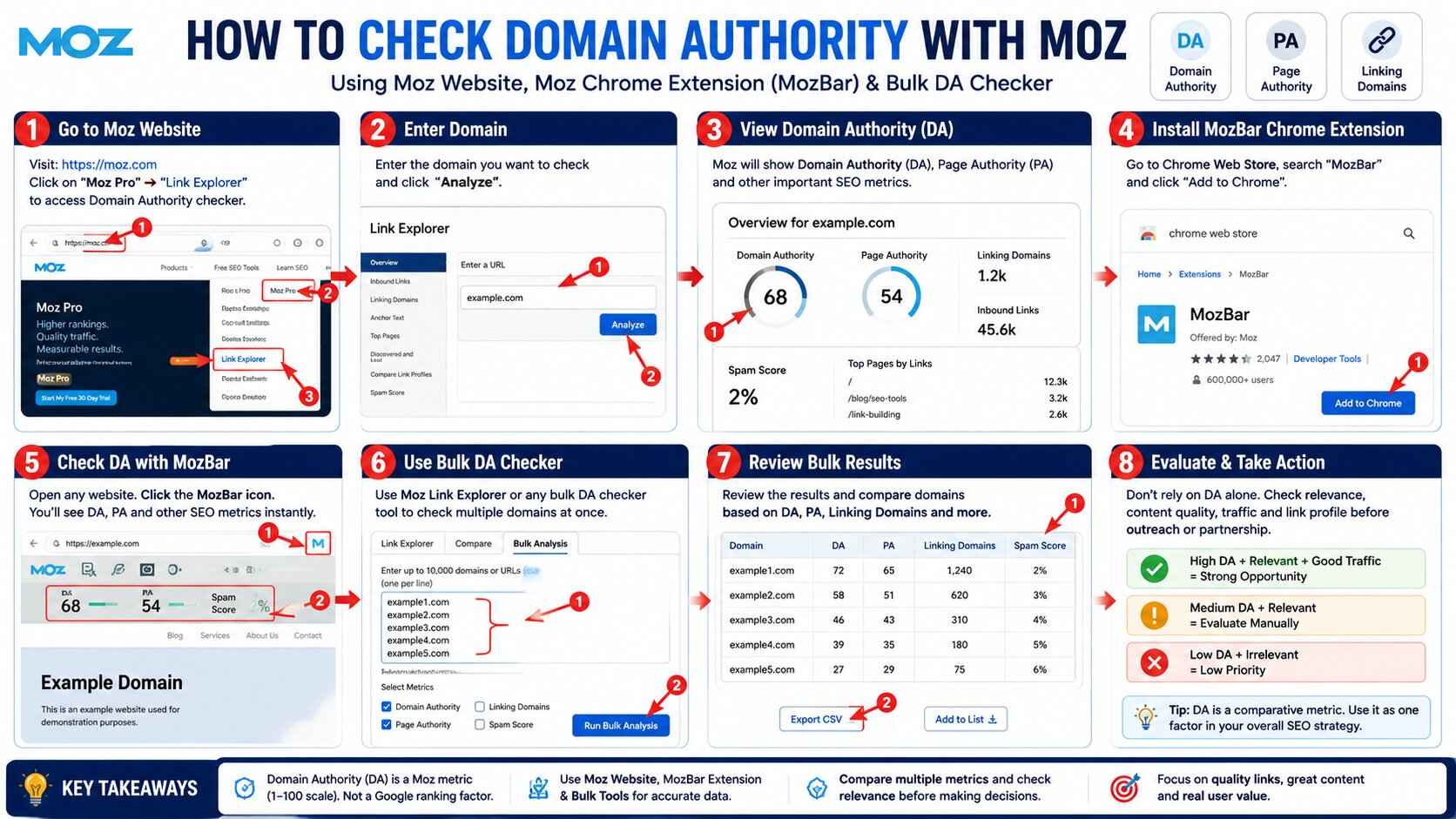
How to Check Domain Authority With Moz
The exact interface can change as Moz updates its products, but the basic process is straightforward.
Step 1: Choose a Moz Tool
Moz provides Domain Authority through tools such as Link Explorer and MozBar.
Step 2: Enter the Domain
Enter the website or domain you want to analyze.
For example:
example.com
Step 3: Review the Authority Data
Look at the available Domain Authority and related link metrics.
Step 4: Compare Relevant Websites
Compare the domain with competitors or potential link opportunities.
Step 5: Investigate the Link Profile
Don’t stop at the DA number.
Review the website’s:
- Linking domains
- Backlink quality
- Relevance
- Content
- Organic visibility
- Reputation
This provides much better context.
Domain Authority Checker Moz Free Options
Many people search for “domain authority checker moz free” because they want to check a website without purchasing a full SEO subscription.
Moz offers free access to certain SEO tools and features, although the exact limits and access requirements can vary over time.
MozBar, for example, provides free access to certain functionality, while a free Moz account can provide additional DA and PA access. The current Chrome Web Store listing identifies MozBar as Moz’s SEO toolbar and shows DA and PA among its key metrics.
Free third-party tools also exist, but users should understand an important distinction.
If a tool claims to show “Moz DA,” check whether it is actually using current Moz data or another database that may be cached or independently maintained.
A free checker is useful for quick research, but for important SEO decisions, verify the data source and freshness.
Domain Authority Checker Moz Chrome Extension
One of the easiest ways to examine SEO metrics while browsing websites is MozBar, Moz’s browser extension.
MozBar is available for Chrome and provides SEO information directly in the browser. The current Chrome Web Store listing says that MozBar can display Domain Authority, Page Authority, and Brand Authority, along with other SEO analysis features.
The extension is particularly useful when researching search results.
Instead of opening a separate SEO tool for every website, you can browse pages and inspect available metrics within the browser.
What Can the Moz Chrome Extension Do?
The modern MozBar provides several SEO-related functions.
According to its current Chrome Web Store listing, features include:
- Domain Authority
- Page Authority
- Brand Authority
- Link analysis
- On-page element analysis
- SERP analysis
- Link highlighting
- Schema and technical checks
- CSV export
- Keyword and content insights for appropriate access levels
The extension has different access levels, with more advanced capabilities available to Moz Pro subscribers.
How to Use the Moz Chrome Extension for DA Checking
Using the extension is simple.
Step 1: Install MozBar
Install the official MozBar extension from the Chrome Web Store.
Step 2: Sign In if Required
Some features require a free Moz account or a Moz Pro subscription.
Step 3: Open a Website
Visit the website or page you want to analyze.
Step 4: Review the Available Metrics
MozBar can display available authority and link metrics while you browse.
Step 5: Compare Competitors
Open several competing websites and compare their metrics.
Remember that the goal is not to find the website with the biggest number and automatically declare it the best.
Look at the complete SEO picture.
What Is Page Authority?
Page Authority, or PA, is different from Domain Authority.
DA evaluates the predicted ranking strength of an entire domain, while PA predicts the ranking strength of an individual page.
Moz describes both DA and PA as predictive scores based on machine-learning models and link-related metrics.
This distinction is useful when evaluating backlinks.
For example, a domain might have moderate DA while a specific article or page has stronger authority because it has earned valuable links.
DA vs PA: What’s the Difference?
Think of it this way:
Domain Authority: evaluates the domain as a whole.
Page Authority: evaluates an individual page.
You should use both when appropriate.
If you are evaluating a potential guest-post opportunity, for example, the authority of the specific page and the quality of the entire website can both provide useful context.
What Is a Bulk Domain Authority Checker Moz Workflow?
A bulk domain authority checker allows you to evaluate multiple domains rather than checking them individually.
This is particularly useful for SEO agencies, link builders, digital marketers, and website owners who work with large lists.
For example, imagine you have 100 potential websites for a backlink campaign.
Checking every website manually can take considerable time.
A bulk workflow allows you to organize the domains and analyze them together, depending on the tool’s available limits and data source.
Here’s a practical bulk-checking table you can add to the article:
| Domain | DA | PA | Linking Domains | Organic Traffic | Relevance | SEO Opportunity |
|---|---|---|---|---|---|---|
| example1.com | 72 | 65 | 1,240 | 85K | High | Strong prospect |
| example2.com | 58 | 51 | 620 | 32K | High | Good prospect |
| example3.com | 46 | 43 | 310 | 14K | Medium | Evaluate content |
| example4.com | 39 | 35 | 180 | 8K | High | Potential prospect |
| example5.com | 27 | 29 | 75 | 2K | Low | Low priority |
How to use the table:
When checking domains in bulk, don’t select websites based on DA alone. Compare DA, PA, linking domains, organic traffic, and topical relevance. A website with a lower DA but strong relevance and real organic traffic can be more valuable than a high-DA website with little visibility or unrelated content.
For backlink prospecting, you can prioritize domains as follows:
- High priority: Relevant topic + genuine traffic + strong link profile
- Medium priority: Relevant domain with reasonable authority and visibility
- Low priority: Low relevance, little traffic, or questionable backlink profile
This makes the bulk DA-checking process much more useful for actual SEO decisions.
Why Use a Bulk Domain Authority Checker?
Bulk checking is useful for:
- Link prospecting
- Competitor research
- Backlink audits
- Outreach campaigns
- Domain research
- Expired-domain analysis
- SEO reporting
- Agency workflows
Instead of repeatedly entering domains one by one, you can process a list and then prioritize the most relevant opportunities.
How to Use a Bulk DA Checker
The exact process depends on the tool.
A typical workflow looks like this:
Step 1: Prepare Your Domain List
Create a spreadsheet or text file containing the domains you want to investigate.
Step 2: Remove Duplicates
Make sure the same website isn’t listed multiple times.
Step 3: Normalize the URLs
Keep the format consistent.
For example, decide whether your list should contain root domains or full URLs.
Step 4: Submit the List
Paste or upload the domains into a bulk checking tool that supports multiple entries.
Step 5: Review the Results
Compare available metrics such as:
- DA
- PA
- Linking domains
- Backlinks
- Spam-related metrics
Step 6: Manually Review Important Prospects
Never select a backlink opportunity based only on DA.
Visit the website and evaluate it yourself.
How to Evaluate a Website Beyond DA
DA is useful, but it should never be your only SEO metric.
Before acquiring a backlink, consider:
Relevance
Does the website operate in your industry or cover topics relevant to your audience?
Content Quality
Does the website publish useful, original content?
Real Audience
Does the website appear to have genuine users and engagement?
Organic Search Visibility
Does the website appear to receive search traffic for meaningful queries?
Linking Profile
Are its backlinks relevant and trustworthy?
Website Reputation
Does the site look like a legitimate publication or business?
Spam Signals
Does the site appear to exist primarily for selling links?
These questions are often more valuable than simply asking whether the DA is high.
Is a Higher DA Always Better?
No.
A higher DA can be useful for comparison, but it does not automatically mean a website is a better backlink opportunity.
Imagine two websites:
Website A
DA 70
Unrelated industry
Little useful content
Suspicious backlink profile
Website B
DA 40
Highly relevant industry
Excellent content
Real audience
Strong reputation
Website B could be the more appropriate link opportunity.
This is why DA should be treated as one data point rather than the final decision.
Can You Increase Domain Authority?
You don’t directly “increase DA” through a button or setting.
Instead, you improve the underlying factors that can contribute to stronger authority signals.
A sustainable approach includes:
- Creating useful content
- Earning relevant backlinks
- Building relationships with legitimate websites
- Improving your website’s reputation
- Promoting valuable resources
- Fixing technical SEO problems
Avoid buying large quantities of low-quality links simply to increase a third-party metric.
Your real objective should be better search visibility, qualified traffic, leads, and business results.
Domain Authority and Link Building
DA is particularly popular in link-building campaigns.
SEO professionals may use it as an initial filtering metric when reviewing potential websites.
For example, an agency could organize prospects into groups based on authority and then manually review:
- Relevance
- Content quality
- Traffic
- Reputation
- Link profile
This creates a much better process than using a single DA threshold.
Problems With Using DA Alone
There are several reasons not to rely entirely on Domain Authority.
DA Is Not Google Data
It is a Moz metric.
DA Does Not Measure Business Value
A high-DA website may generate little relevant traffic for your target audience.
DA Does Not Guarantee Rankings
A high DA does not guarantee that a specific page will rank.
DA Can Change
Moz can update its link index and authority calculations, which can cause scores to change.
DA Doesn’t Replace Human Review
SEO tools cannot completely evaluate editorial quality, relevance, reputation, and audience fit.
How SEO Agencies Can Use DA Responsibly
A professional SEO agency should use Domain Authority as part of a broader evaluation system.
For example:
Step 1: Collect potential websites.
Step 2: Check DA and other available metrics.
Step 3: Remove obviously poor-quality sites.
Step 4: Review topical relevance.
Step 5: Check website quality and reputation.
Step 6: Analyze organic visibility.
Step 7: Review backlink quality.
Step 8: Decide whether the opportunity makes sense.
This approach produces much better results than saying:
“Only websites with DA 50+ are acceptable.”
Frequently Asked Questions
What Is a Domain Authority Checker Moz?
It is a tool or Moz feature used to view Moz’s Domain Authority metric for a website and, depending on the tool, related SEO and link metrics.
Is Moz Domain Authority Free?
Some Moz tools and features provide free access, while more advanced data and usage may require a Moz account or Moz Pro subscription. MozBar currently offers free functionality with additional capabilities available depending on access level.
Is There a Domain Authority Checker Moz Chrome Extension?
Yes. MozBar is Moz’s browser extension and can display metrics including Domain Authority and Page Authority while you browse.
Is Domain Authority a Google Ranking Factor?
No. Domain Authority is a Moz metric designed to predict ranking ability. It is not a Google-published ranking score.
What Is a Good Domain Authority Score?
There is no universal DA score that can be classified as “good” for every website.
The more useful approach is to compare your website with relevant competitors and evaluate whether the authority of potential link opportunities makes sense within your industry.
How Can I Check Domain Authority for Multiple Websites?
You can use a bulk domain authority checker that supports multiple domains, or use SEO software with bulk analysis capabilities.
The available number of domains depends on the specific tool and plan.
Does High DA Mean High Google Rankings?
No.
DA is a predictive Moz metric. Rankings depend on many factors, including relevance, content quality, technical SEO, competition, links, and search intent.
Should I Buy Backlinks From High-DA Websites?
Don’t choose backlinks based solely on DA.
Evaluate relevance, editorial quality, reputation, traffic, and the overall quality of the website before pursuing a link.
What Is the Difference Between DA and PA?
DA evaluates the predicted authority of a domain, while PA evaluates the predicted authority of an individual page.
Final Thoughts
A Domain Authority Checker Moz tool can be useful for SEO research, competitor analysis, backlink evaluation, and website audits. Moz’s Domain Authority provides a convenient 1–100 comparative metric, while tools such as MozBar make it possible to review SEO information directly while browsing.
If you’re searching for a domain authority checker Moz free option, start by understanding exactly what data the tool provides and where that data comes from. For everyday research, free tools and browser-based solutions can be useful, while larger SEO campaigns may benefit from more advanced software.
The Domain Authority Checker Moz Chrome extension, particularly MozBar, is useful for quickly examining authority metrics during competitive and SERP research. For agencies and marketers working with large prospect lists, a bulk domain authority checker Moz workflow can save time by allowing multiple domains to be reviewed systematically.
Most importantly, don’t let DA become the only metric in your SEO strategy. A website’s relevance, content quality, reputation, organic visibility, technical health, and backlink profile all matter.
Use Domain Authority as a comparison and research metric, not as a promise of Google rankings. When combined with careful website evaluation and a quality-focused SEO strategy, it can be a useful part of your SEO toolkit.
Visit UAEseo.agency for more guides like this.