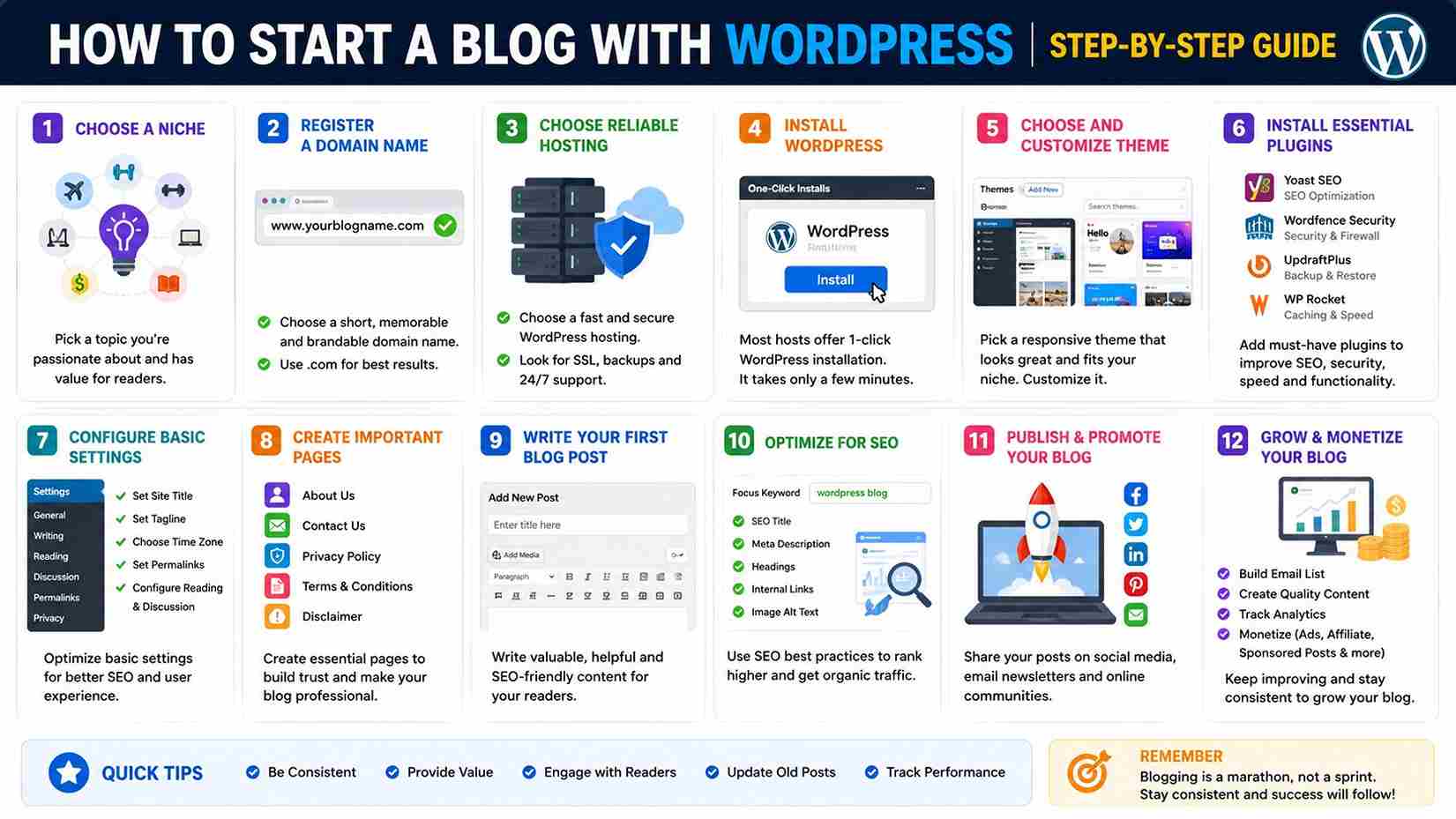
Blog with WordPress: The Complete Beginner’s Guide to Start and Grow a Successful WordPress Blog
Starting a blog with WordPress is one of the best ways to share your knowledge, build an online brand, generate leads, or even create a full-time income. Whether you want to start a personal blog, a business blog, or a niche website, WordPress offers the flexibility and features needed to grow successfully.
Many beginners think blogging requires advanced technical skills or coding knowledge. Fortunately, WordPress makes the process simple, allowing anyone to build a professional blog without writing a single line of code.
In this comprehensive guide on Uaeseo.agency, you’ll learn everything you need to know about creating a blog with WordPress, from choosing the right hosting and theme to publishing SEO-friendly articles that attract readers and rank on Google.
Why Choose WordPress for Blogging?
WordPress powers more than 40% of all websites worldwide and remains the most popular content management system.
Here are some reasons bloggers choose WordPress:
- Easy to use
- SEO-friendly
- Thousands of themes
- Over 60,000 plugins
- Mobile responsive designs
- Fast loading options
- Large community support
- Complete ownership of your content
Unlike many blogging platforms, WordPress gives you full control over customization and monetization.
WordPress.com vs WordPress.org
One of the biggest beginner questions is choosing between WordPress.com and WordPress.org.
WordPress.com
- Hosted solution
- Limited customization
- Easier setup
- Suitable for hobby blogs
WordPress.org
- Self-hosted
- Complete control
- Unlimited plugins
- Better SEO
- Full monetization options
- Professional blogging
For serious blogging and business growth, WordPress.org is the recommended choice.
Step 1: Choose Your Blogging Niche
Before building your blog, define your niche.
Popular blogging niches include:
- Digital marketing
- Technology
- Travel
- Food
- Fitness
- Personal finance
- Health
- Education
- Business
- WordPress tutorials
Choose a niche you understand well and can consistently create valuable content about.
Step 2: Register a Domain Name
Your domain is your blog’s online identity.
A good domain should be:
- Short
- Memorable
- Easy to spell
- Brandable
- Relevant to your niche
Examples:
- mytravelguide.com
- healthyrecipes.com
- techsolutions.com
Avoid long or confusing names with unnecessary numbers or hyphens.
Step 3: Choose Reliable WordPress Hosting
Your hosting provider affects:
- Website speed
- Security
- Uptime
- SEO
- User experience
Look for hosting that offers:
- One-click WordPress installation
- Free SSL certificate
- Daily backups
- Fast SSD storage
- Excellent customer support
Quality hosting provides a strong foundation for your blog.
Step 4: Install WordPress
Most hosting providers offer one-click WordPress installation.
The process usually takes only a few minutes.
After installation, you’ll receive access to the WordPress dashboard where you can manage your website.
Step 5: Select a Professional Theme
Your theme controls your blog’s appearance.
Choose a responsive theme that offers:
- Fast loading speed
- Mobile optimization
- Clean layout
- SEO-friendly coding
- Customization options
A simple design often performs better than overly complex layouts.
Step 6: Install Essential WordPress Plugins
Plugins extend your blog’s functionality.
Recommended plugins include:
SEO Plugin
Helps optimize your content for search engines.
Security Plugin
Protects your blog from hackers and malware.
Backup Plugin
Creates regular backups of your website.
Cache Plugin
Improves loading speed.
Contact Form Plugin
Allows visitors to contact you easily.
Install only necessary plugins to maintain performance.
Step 7: Configure Basic WordPress Settings
Before publishing content, review important settings.
Update:
- Site title
- Tagline
- Time zone
- Permalink structure
- Reading settings
- Discussion settings
Using SEO-friendly permalinks improves readability and search rankings.
Step 8: Create Essential Pages
Every professional blog should include:
About Page
Introduce yourself or your business.
Contact Page
Allow readers to reach you.
Privacy Policy
Required for legal compliance.
Terms and Conditions
Protects your website legally.
Disclaimer
Important if you provide financial, health, or affiliate advice.
Step 9: Plan Your Content Strategy
Successful blogs publish consistent, helpful content.
Create a content calendar including:
- Educational articles
- Tutorials
- Guides
- Case studies
- Product reviews
- Industry news
- Frequently asked questions
Planning ahead helps maintain consistency.
Step 10: Write High-Quality Blog Posts
Google rewards helpful, original content.
Every article should:
- Solve a problem
- Answer user questions
- Be well structured
- Include headings
- Use simple language
- Provide actionable advice
Avoid writing solely for search engines.
Always prioritize readers.
How to Structure a Blog Post
A strong structure improves readability.
Recommended format:
- Engaging introduction
- Clear headings
- Short paragraphs
- Bullet points
- Images
- Step-by-step instructions
- Frequently asked questions
- Conclusion
Well-organized articles keep readers engaged longer.
Optimize Your Blog for SEO
Search engine optimization helps readers find your content.
Basic SEO includes:
- Keyword research
- Optimized titles
- Meta descriptions
- Internal linking
- Image optimization
- Fast loading speed
- Mobile responsiveness
SEO is an ongoing process rather than a one-time task.
Use Categories and Tags Properly
Categories organize broad topics.
Example:
- WordPress
- SEO
- Blogging
- Marketing
Tags describe specific article topics.
Avoid creating too many unnecessary categories or tags.
Add High-Quality Images
Images improve user engagement.
Use:
- Screenshots
- Infographics
- Charts
- Original photos
Optimize images before uploading to improve loading speed.
Always include descriptive alt text for accessibility and SEO.
Make Your Blog Mobile Friendly
Most visitors now browse websites using smartphones.
Ensure your blog:
- Loads quickly
- Displays correctly on mobile devices
- Has readable text
- Uses responsive images
- Offers easy navigation
Mobile usability directly affects user experience and search rankings.
Improve Blog Speed
Slow websites lose visitors quickly.
Ways to improve speed:
- Compress images
- Enable caching
- Minimize plugins
- Use a CDN
- Optimize databases
- Choose fast hosting
Fast websites improve both SEO and user satisfaction.
Build an Email List
Email marketing helps you build long-term relationships with readers.
Offer:
- Free guides
- Checklists
- Templates
- Newsletters
- Exclusive content
Growing an email list reduces dependence on search engine traffic.
Promote Your Blog
Publishing content is only the first step.
Promote your articles through:
- Social media
- Email newsletters
- Online communities
- Industry forums
- Guest blogging
- Internal linking
Promotion increases visibility and traffic.
Monetize Your WordPress Blog
Once your blog attracts visitors, you can generate income through:
- Display advertising
- Affiliate marketing
- Sponsored content
- Digital products
- Online courses
- Consulting
- Membership websites
Choose monetization methods that align with your audience.
Common Blogging Mistakes to Avoid
Many beginners struggle because of avoidable mistakes.
Common issues include:
- Publishing inconsistent content
- Ignoring SEO
- Choosing poor hosting
- Installing too many plugins
- Writing only promotional articles
- Not updating older content
- Slow website speed
- Poor navigation
Avoiding these mistakes improves your chances of long-term success.
Blogging Tips for Long-Term Success
Successful bloggers focus on consistency.
Best practices include:
- Publish regularly
- Update old articles
- Learn basic SEO
- Build backlinks naturally
- Respond to comments
- Track website analytics
- Improve content quality
- Study your audience
Blogging is a long-term investment that rewards patience and continuous improvement.
Frequently Asked Questions
Is WordPress Good for Blogging?
Yes. WordPress is widely considered the best blogging platform because of its flexibility, SEO capabilities, and extensive customization options.
Do I Need Coding Skills?
No. Most WordPress blogs can be built and managed without coding knowledge.
How Much Does It Cost to Start a Blog?
Costs vary depending on your hosting provider, domain registration, premium themes, and optional plugins. Many beginners can start with a relatively small investment.
How Often Should I Publish Blog Posts?
Quality is more important than quantity. Publishing one or two valuable articles each week is better than posting low-quality content daily.
Can I Make Money from a WordPress Blog?
Yes. Many bloggers earn income through advertising, affiliate marketing, sponsored posts, digital products, consulting, and online courses.
How Long Does It Take to Get Blog Traffic?
Organic traffic usually takes several months to grow. Consistent publishing, SEO optimization, and content promotion help accelerate results.
Final Thoughts
Creating a blog with WordPress is one of the smartest ways to build an online presence, share valuable knowledge, and grow a personal or business brand. WordPress provides the flexibility, scalability, and tools needed for beginners and experienced bloggers alike.
Success doesn’t come from simply publishing articles—it comes from consistently creating helpful, high-quality content that solves real problems for your audience. Combine valuable content with good SEO practices, a fast and secure website, and regular promotion to build long-term organic traffic.
Whether your goal is to educate, generate leads, build authority, or earn income online, WordPress gives you everything you need to create a professional blog that can grow for years to come.