Complete Beginner’s Guide to Google Search Console (2026)
Google Search Console (GSC) is one of the most powerful free SEO tools available. If you own a website, blog, eCommerce store, or business website, learning how to use Google Search Console can help you improve your website’s visibility on Google, identify SEO problems, and monitor your organic traffic.
Many beginners install Google Search Console but never take advantage of its features. They miss valuable insights about how Google sees their website, which pages are indexed, what keywords bring visitors, and what technical issues may be affecting rankings.
This comprehensive guide on Uaeseo.agency about Google Search Console tutorial explains everything you need to know, from setting up your account to using every important feature that helps improve your website’s SEO performance.
What Is Google Search Console?
Google Search Console is a free tool provided by Google that helps website owners monitor, maintain, and improve their website’s presence in Google Search.
It allows you to:
- Monitor website performance
- Check keyword rankings
- Submit XML sitemaps
- Request page indexing
- Identify technical SEO issues
- Monitor backlinks
- Detect security problems
- Improve search visibility
Unlike Google Analytics, which focuses on visitor behavior, Google Search Console focuses on how your website performs in Google Search.
Why Google Search Console Is Important
Without Google Search Console, you won’t know how Google views your website.
GSC helps you answer questions like:
- Is my website indexed?
- Which keywords generate traffic?
- Why are some pages not ranking?
- Are there crawl errors?
- Does Google find my website mobile-friendly?
- Are there security issues?
These insights help you make informed SEO decisions.
Benefits of Using Google Search Console
Businesses and website owners use Google Search Console to:
- Improve organic traffic
- Identify SEO opportunities
- Monitor indexing
- Find broken pages
- Improve user experience
- Detect technical issues
- Track keyword performance
- Increase website visibility
The tool is completely free and recommended by Google for every website owner.
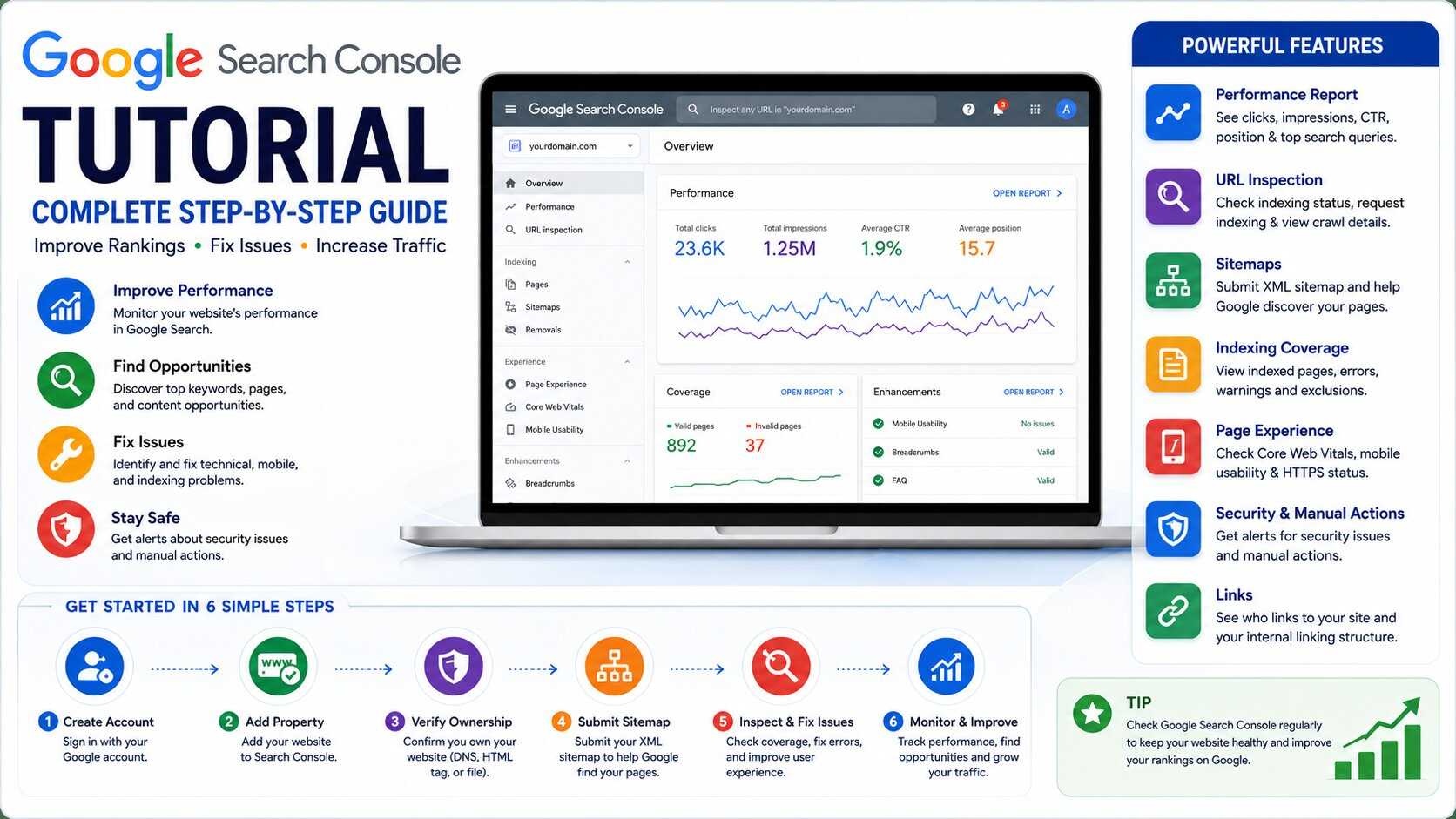
Step 1: Create a Google Search Console Account
Getting started is simple.
You’ll need:
- A Google account
- A website
- Access to your website hosting or DNS settings
After signing in, you’ll be asked to add your website property.
Step 2: Add Your Website
Google offers two verification methods.
Domain Property
This verifies your entire domain, including:
- HTTPS
- HTTP
- www
- non-www
- Subdomains
This is Google’s recommended option.
URL Prefix Property
This verifies only the exact URL you enter.
Example:
It does not automatically include:
- http versions
- www versions
- Subdomains
Choose the option that best matches your needs.
Step 3: Verify Website Ownership
Google must confirm you own the website.
Common verification methods include:
- DNS record
- HTML file upload
- HTML meta tag
- Google Analytics
- Google Tag Manager
DNS verification is generally recommended because it covers the entire domain.
Once verified, Google begins collecting website data.
Step 4: Submit Your XML Sitemap
An XML sitemap helps Google discover your website pages more efficiently.
To submit a sitemap:
- Open Google Search Console
- Click Sitemaps
- Enter:
yourdomain.com/sitemap.xml
- Click Submit
Google will begin crawling the sitemap.
Submitting a sitemap does not guarantee indexing, but it helps Google discover your content more efficiently.
Step 5: Understand the Dashboard
The Search Console dashboard contains several important reports.
Main sections include:
- Overview
- Performance
- URL Inspection
- Indexing
- Experience
- Enhancements
- Security
- Links
Learning these reports helps you identify SEO opportunities.
Performance Report
The Performance report shows how your website performs in Google Search.
Important metrics include:
Total Clicks
The number of users who clicked your website.
Total Impressions
How many times your pages appeared in Google Search.
Average CTR
Click-through rate shows how often people clicked after seeing your listing.
Average Position
Your average ranking position for keywords.
These metrics help measure SEO progress.
Keyword Performance
One of the most valuable features is keyword reporting.
You can discover:
- Search queries
- Clicks
- Impressions
- CTR
- Average ranking
This information helps you identify:
- High-performing keywords
- Ranking opportunities
- Content improvements
URL Inspection Tool
The URL Inspection Tool checks individual pages.
You can see:
- Indexing status
- Crawl information
- Mobile usability
- Canonical URL
- Last crawl date
If a page isn’t indexed, you can request indexing after fixing any issues.
Request Indexing
Published a new article?
Updated an old page?
Use URL Inspection.
Then click:
Request Indexing
Google will schedule the page for crawling.
Although this doesn’t guarantee immediate indexing, it usually speeds up the discovery process.
Indexing Report
The Indexing report shows:
- Indexed pages
- Non-indexed pages
- Crawl errors
- Redirect issues
- Duplicate pages
Common reasons pages aren’t indexed include:
- Noindex tags
- Duplicate content
- Crawl errors
- Soft 404 pages
- Redirect chains
Review these regularly.
Page Experience
Google measures user experience through Page Experience reports.
Important factors include:
- Mobile usability
- HTTPS security
- Core Web Vitals
Improving these metrics often leads to better user satisfaction and stronger SEO performance.
Core Web Vitals
Core Web Vitals measure real-world page performance.
Google evaluates:
Largest Contentful Paint (LCP)
Measures loading speed.
Interaction to Next Paint (INP)
Measures responsiveness.
Cumulative Layout Shift (CLS)
Measures visual stability.
Improving these metrics creates a better browsing experience.
Mobile Usability
Most users browse websites using smartphones.
The Mobile Usability report identifies problems such as:
- Text too small
- Clickable elements too close
- Content wider than screen
- Viewport issues
Fixing mobile problems improves usability and search performance.
Security Issues Report
Google alerts website owners if it detects:
- Malware
- Hacked content
- Phishing
- Harmful downloads
Address security issues immediately to protect visitors and maintain trust.
Manual Actions
If your website violates Google’s spam policies, it may receive a Manual Action.
Examples include:
- Spam backlinks
- Cloaking
- Thin content
- Hidden text
- Structured data abuse
Manual actions can significantly reduce search visibility.
Always follow Google’s Search Essentials.
Links Report
The Links report shows:
External Links
Websites linking to your content.
Internal Links
How your pages connect internally.
Backlinks remain an important ranking factor when earned naturally.
Review this report to understand your website’s authority.
Enhancements Report
Depending on your website, you may see reports for:
- Breadcrumbs
- Products
- FAQs
- Videos
- Structured data
Fixing enhancement errors helps Google better understand your content.
Monitor Website Coverage
Regularly monitor:
- Indexed pages
- Crawl status
- New errors
- Sitemap status
Small technical issues can become larger problems if ignored.
How Often Should You Check Google Search Console?
A simple routine works well.
Daily
- Check major errors
- Monitor indexing requests
Weekly
- Review keyword performance
- Monitor traffic trends
- Check crawl issues
Monthly
- Review backlinks
- Improve underperforming pages
- Analyze search queries
- Update SEO strategy
Consistency helps maintain long-term SEO health.
Common Google Search Console Errors
Crawled – Currently Not Indexed
Google discovered the page but hasn’t indexed it yet.
Improve:
- Content quality
- Internal links
- Originality
Discovered – Currently Not Indexed
Google knows about the page but hasn’t crawled it yet.
Large websites often experience this.
Soft 404
Google thinks a page doesn’t provide useful content.
Improve page quality or redirect appropriately.
Duplicate Without User-Selected Canonical
Google detected duplicate pages.
Use canonical tags where appropriate.
Page With Redirect
Redirects are normal unless they create unnecessary chains.
Tips for Better SEO Using Search Console
To improve rankings:
- Publish helpful content regularly
- Monitor keyword opportunities
- Fix indexing issues
- Improve page speed
- Build quality backlinks
- Optimize titles and meta descriptions
- Strengthen internal linking
- Update outdated articles
Search Console helps identify where improvements are needed.
Common Mistakes Beginners Make
Avoid these common errors:
- Ignoring crawl errors
- Never submitting a sitemap
- Not checking indexing status
- Focusing only on rankings
- Ignoring mobile usability
- Forgetting to update content
- Overlooking Core Web Vitals
Using Search Console consistently provides valuable long-term insights.
Frequently Asked Questions
Is Google Search Console Free?
Yes. Google Search Console is completely free to use.
Is Google Search Console Necessary?
Yes. It is one of the most important SEO tools for understanding how your website performs in Google Search.
Does Google Search Console Improve Rankings?
The tool itself does not improve rankings, but the insights it provides help you identify and fix SEO issues that can improve performance.
How Long Does It Take to Show Data?
After verification, Search Console usually begins displaying data within a few days, though some reports may take longer to populate.
Can I Use Google Search Console Without Google Analytics?
Yes. Google Search Console and Google Analytics are separate tools and can be used independently, though using both provides a more complete understanding of your website’s performance.
Final Thoughts
Google Search Console is an essential tool for anyone who wants to improve their website’s visibility in Google Search. It provides valuable insights into indexing, keyword performance, technical SEO, page experience, and website health—all at no cost.
By regularly reviewing Search Console reports, fixing technical issues, monitoring keyword performance, and optimizing your content based on real search data, you can build a stronger SEO strategy and improve your website’s long-term search performance.
Whether you’re a beginner or an experienced website owner, mastering Google Search Console is one of the smartest investments you can make for your website’s growth.