Render Hosting: Plans, Pricing, Features and Setup Guide
You have built a website or web application, pushed your code to GitHub, and now need somewhere to run it without managing a traditional server. If you are exploring hosting options from the UAE, Render hosting is one platform worth understanding. It connects your code repository to a deployment service, allowing you to publish applications, APIs and static websites with much of the server setup handled for you.
Render hosting is a cloud platform for deploying and running websites, web applications, APIs, background workers and databases. It offers free and paid options, supports custom domains and HTTPS, and can automatically deploy code when you push changes to a connected Git repository. However, its free services have limitations that matter if you are launching a business website or customer-facing application.
Safety Note: What Should You Check Before Using Render?
Before deploying a live application, verify that you are using the official Render website at https://render.com/ and review its current pricing and service limits. Never commit API keys, database passwords or other secrets to a public repository. Free services can sleep, restart or lose local files, and free databases have an expiry limit. Pricing, quotas and platform features can change; information in this guide was checked on 19 October 2026. Render is a commercial hosting platform, not a UAE government service. This guide on UAEseo.agency is general technical information, not financial or legal advice.
What Is Render Hosting?
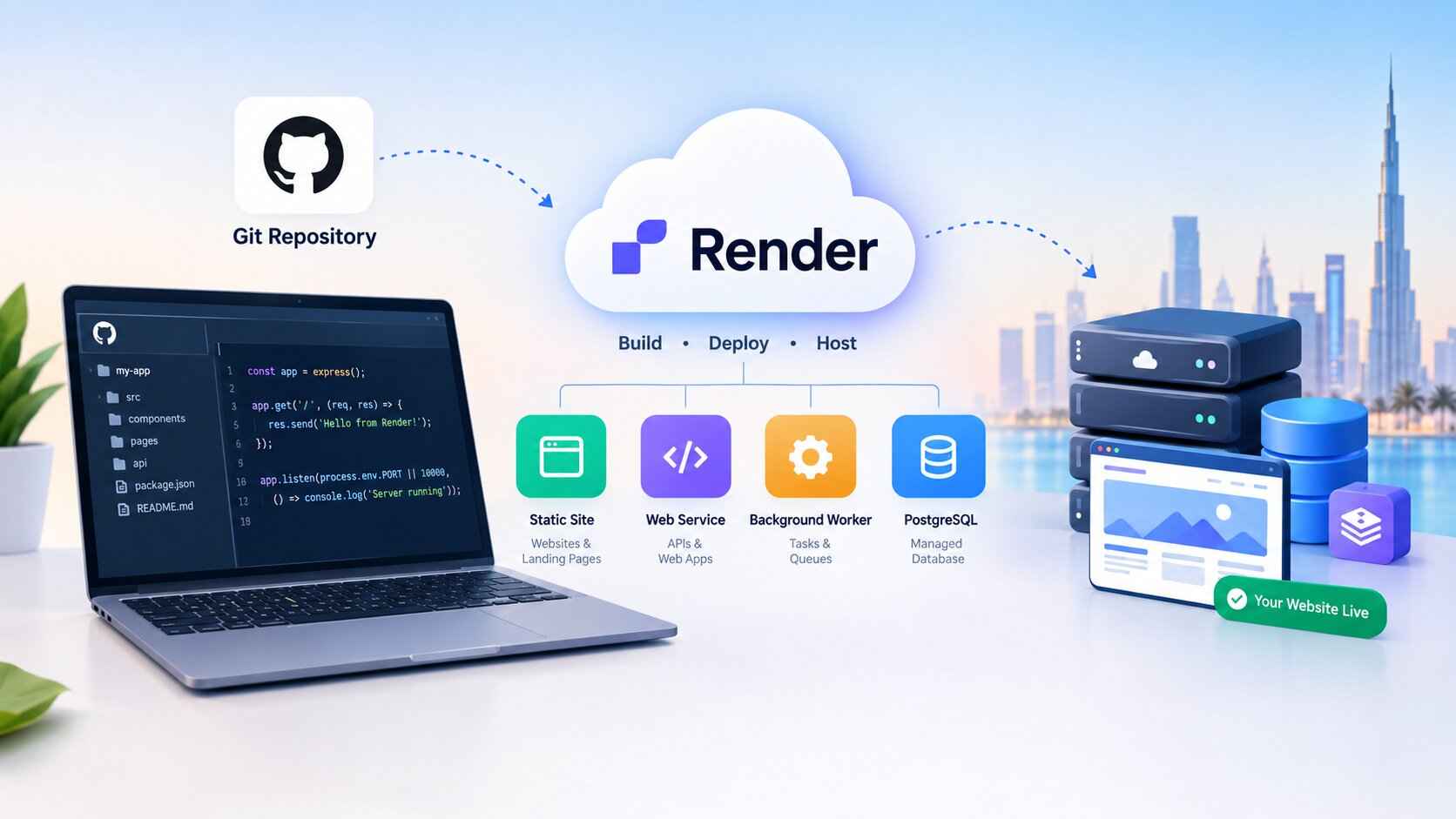
Render is a cloud application platform that helps developers build, deploy and operate applications without managing every part of the underlying infrastructure themselves. You can connect a code repository, configure a build and start command, select a service plan, and publish the result.
Unlike traditional shared hosting, which commonly focuses on websites managed through tools such as cPanel, Render is designed around deploying applications and services. It is particularly useful for developers working with modern frameworks and Git-based workflows.
For example, a developer in Dubai building a booking application could deploy a frontend as a static site, run the application’s API as a web service, and store its data in a managed PostgreSQL database. Each component has its own role and potentially its own cost.
Render supports applications built with technologies such as Node.js, Python, Ruby, Go, Rust and Elixir. Docker can be used for supported applications that need a custom runtime environment.
What can you host on Render?
Common use cases include:
- Static websites built with HTML, CSS and JavaScript.
- Backend applications using frameworks such as Express, Django or FastAPI.
- REST APIs and application backends.
- Background workers that process tasks outside the main web request.
- Scheduled jobs that run at specified times.
- Managed PostgreSQL databases and Redis-compatible Key Value services.
- Docker-based applications.
You should choose a service type based on what your application actually needs. A static portfolio site does not require the same infrastructure as a full-stack booking system.
How Does Render Hosting Work?
Render connects your code to a managed deployment process. When you update code in a connected Git repository, Render can build and deploy the new version automatically, depending on your service configuration.
A typical deployment follows this sequence:
- Create your project: Build your website or application locally and store its code in a Git repository.
- Connect the repository: Sign in to Render and connect the relevant Git provider or choose another supported deployment method.
- Choose a service type: Select a static site, web service or another suitable service.
- Configure the build: Enter the required build command, start command and environment variables.
- Select a plan: Choose a free or paid option appropriate for the workload.
- Deploy and test: Wait for the build to finish, open the generated URL, and test the application before connecting your main domain.
A static site might not need a server-side start command. A dynamic web service does, and the application must listen on the correct port. Render’s documentation recommends using the PORT environment variable and binding the public web server to 0.0.0.0.
Official setup guide: https://render.com/docs/your-first-deploy
What Are the Main Render Hosting Service Types?
Understanding the service types helps you avoid paying for resources you do not need.
| Service type | What it does | Typical use |
|---|---|---|
| Static Site | Publishes static files through a managed hosting and CDN setup | Portfolio, documentation, static landing page |
| Web Service | Runs an application that handles HTTP requests | API, backend, dynamic website |
| Private Service | Runs a service that is not publicly accessible | Internal application component |
| Background Worker | Processes jobs outside normal web requests | Email processing, queued tasks |
| Cron Job | Runs scheduled tasks | Periodic reports, cleanup tasks |
| Workflow | Coordinates defined task runs | Multi-step automated processes |
| Render Postgres | Managed relational database | Application data |
| Key Value | Redis-compatible data service | Caching and temporary data |
These services are not interchangeable. A static site is often the simplest choice for a site that only serves prebuilt files. If your application needs server-side code, authentication logic or API endpoints, you may need a web service as well.
Reference: https://render.com/docs/service-types
Is Render Hosting Free?
Yes, Render offers free deployment options, but free does not mean unlimited or suitable for every production workload. Static sites can be deployed for free, and certain web services and data services also have free plans with specific restrictions.
The main drawback for a free web service is its idle behaviour. Render spins down a free web service after 15 minutes without inbound traffic. When someone visits again, the service needs to start up, and Render says this process takes about one minute.
This can be acceptable for a learning project or demonstration. It is less suitable when a customer expects an immediate response from a booking form, dashboard or API.
What are the limitations of free Render hosting?
Check these restrictions before choosing the free option:
- Cold starts: Free web services spin down after 15 minutes of inactivity.
- Temporary local storage: Changes to a free web service’s local filesystem can be lost when it restarts, redeploys or spins down.
- No persistent disk on free web services: You cannot rely on local files for permanent uploads or database storage.
- Free database expiry: Free Render Postgres databases expire 30 days after creation under the documented policy.
- Resource and usage limits: Monthly instance hours, bandwidth and build-pipeline allowances apply.
- Limited operational features: Some features available on paid services, including scaling beyond one instance and shell access, are unavailable on free web services.
Render documents 750 free instance hours per workspace per calendar month. Free web services that have spun down do not consume those running instance hours. If the workspace exhausts the allowance, its free web services are suspended until the next month.
Official limits: https://render.com/docs/free
Is free Render hosting suitable for a business?
It can be useful for a prototype, proof of concept, student project, temporary demo or low-risk internal experiment. Before using it for a live business, ask what happens if the application is unavailable during a busy period, if a customer uploads a file, or if the database reaches its expiry date.
For a customer-facing service, calculate the cost of a paid web service and any required database, background worker, storage and bandwidth. Also create a backup and recovery plan. A free tier is a way to test a platform, not a substitute for understanding production requirements.
How Much Does Render Hosting Cost?
Render uses a combination of workspace plans, service compute, storage and usage-based charges. The total depends on what you deploy; the price of a single web service is not necessarily the price of your entire application.
The official pricing page currently lists the following examples. AED values are approximate conversions using USD 1 ≈ AED 3.6725.
| Item | Official listed price | Approximate AED equivalent |
|---|---|---|
| Hobby workspace | $0/month | AED 0/month |
| Pro workspace | $25/month | AED 91.81/month |
| Scale workspace | $499/month | AED 1,832.92/month |
| Small paid web-service compute | $7/month | AED 25.71/month |
| 1 CPU, 2 GB RAM web-service compute | $25/month | AED 91.81/month |
| Public outbound bandwidth above included allowance | $0.15/GB | AED 0.55/GB |
These are examples from the current official pricing information, not a quote for a complete production setup. Workspace charges and compute charges are separate, and different services have different pricing. Taxes, bank conversion fees, additional storage, bandwidth and other usage may affect the amount paid.
Check the official pricing page before committing: https://render.com/pricing
Why can the final Render bill be higher than expected?
Imagine you are building an application with four components: a web service, a background worker, a PostgreSQL database and a Key Value service. Each component may incur its own charge. The workspace plan, outbound traffic and storage can add further costs.
To estimate your monthly total:
- List every service the application requires.
- Choose the appropriate compute or database plan for each one.
- Check which workspace features are included.
- Estimate outbound bandwidth and storage.
- Review included allowances and possible overage charges.
- Set a spending limit or usage alerts where available.
Do not select a plan only because its entry price looks low. A small API with little traffic and a production application with several active components have very different requirements.
How to Deploy a Website on Render
You can deploy a supported website through the Render dashboard. The exact settings depend on whether you are publishing static files or running a dynamic application.
Step 1: Prepare your code
Store the website or application in a repository supported by Render’s deployment workflow. Make sure the project builds successfully and that its dependencies and start instructions are documented.
For a static website, you generally need the output directory created by your build process. For a dynamic application, identify the runtime, build command and start command.
Step 2: Create a new service
Sign in to Render and open the dashboard. Choose the option to create a new service, then select Static Site or Web Service as appropriate.
Connect the repository containing your project and select the branch you want to deploy. Check that the correct project and branch are selected before proceeding.
Step 3: Enter deployment settings
For a web service, you may need to provide:
- A service name.
- A deployment region.
- The runtime or language.
- A build command.
- A start command.
- Environment variables and secrets.
- A health-check path, if your application supports one.
For example, a Node.js application might use npm install as a build command and npm start as its start command, depending on the project’s configuration. Do not copy commands blindly; follow the instructions in your own project.
Step 4: Deploy and inspect the logs
Create the service and wait for the build and deployment process to finish. If it fails, open the deploy logs and look for the first meaningful error. Common causes include missing dependencies, incorrect build commands, missing environment variables and incorrect port binding.
For public web services, the application must listen on the port expected by Render. Using the PORT environment variable is the recommended approach.
Step 5: Test the application
Open the generated onrender.com URL. Test the main pages, API endpoints, login flow, forms and database connections. Check mobile layouts and browser errors as well.
Do not treat a successful deployment message as proof that every feature works. A page may load while form submissions, authentication or database queries still fail.
Step 6: Connect your custom domain
When the application works, add your own domain using the service’s domain settings. Follow Render’s instructions for the required DNS records, verify the domain and confirm that HTTPS works.
Allow time for DNS changes to propagate. Avoid deleting existing DNS records unless you know what they control, especially if the domain also handles business email.
Official web-service guide: https://render.com/docs/web-services
Is Render Hosting Good for UAE Websites?
Render can be a reasonable option for a UAE-based developer or business when the website is an application, API or static frontend that fits the platform’s deployment model. However, suitability depends on the audience, application architecture and hosting requirements—not simply where the owner lives.
Before choosing Render for visitors in Dubai, Abu Dhabi, Sharjah or elsewhere in the UAE, check the available deployment regions and compare expected latency from the actual audience. A platform’s global availability does not automatically mean it has a data centre in the UAE.
If you handle personal or business data, assess the application’s data flows, database location, contractual obligations and any applicable UAE data-protection requirements. Do not assume that choosing a cloud provider automatically satisfies every compliance requirement.
Will Render improve website SEO?
Hosting can influence factors such as response time, uptime and page delivery, which affect the experience visitors receive. But choosing Render does not automatically improve Google rankings.
For a static website, performance depends on factors including the assets served, image sizes, caching, scripts and frontend code. For a dynamic website, backend response times, database queries and application performance also matter.
If search visibility is your goal, test the deployed site with real performance tools, make sure important pages are crawlable, use a valid sitemap where appropriate, and verify canonical tags and redirects. A technically sound hosting setup supports SEO; it cannot replace useful content, relevant pages and a strong overall search strategy.
Render Hosting vs Traditional Web Hosting
Render and traditional shared hosting solve different problems. Render is built around application deployment and service management, while traditional hosting packages often include tools for managing websites, email accounts and databases through a control panel.
| Consideration | Render | Traditional shared hosting |
|---|---|---|
| Main workflow | Deploy code and services | Manage websites through a hosting panel |
| Common users | Developers and application teams | Bloggers, businesses and website owners |
| Static sites | Supported | Usually supported |
| Dynamic applications | Supported through web services and related services | Depends on available runtimes and plan |
| Email hosting | Do not assume it is included | Often available, depending on provider |
| Database setup | Managed service options available | Depends on the package |
| Pricing model | Workspace plus service and usage charges | Often package-based |
| Free-tier behaviour | Free web services can spin down | Depends on provider |
If you want to host a WordPress website with a dashboard, plugins, business email and routine content editing, a conventional WordPress hosting package may be simpler. If you are deploying a custom API or a modern web application from a Git repository, Render may fit better.
What Are the Best Alternatives to Render Hosting?
There is no single best alternative for every project. Compare platforms based on the type of application you are building, the total monthly cost and the amount of infrastructure you want to manage.
- Railway: Worth comparing if you want a developer-oriented platform for deploying applications and related services. Review its current usage-based pricing and limits.
- Vercel: A strong candidate to evaluate for frontend projects and supported serverless workflows. Check framework support and commercial-use plan requirements.
- Netlify: Useful to compare for static websites, frontend deployment and related workflows.
- DigitalOcean App Platform: Worth considering if you want managed application deployment alongside other cloud infrastructure products.
- A conventional WordPress host: Often more appropriate for a typical WordPress business website that needs a familiar content-management workflow, email options and hosting support.
Compare official pricing pages, not only third-party comparison tables. Prices and free allowances can change, and a low starting price may not reflect the total cost of the services your project requires.
Common Render Hosting Problems and How to Fix Them
Why is my Render website slow on the first visit?
If you are using a free web service, it may have spun down after inactivity. The next request triggers a startup process. Test the application after it is active and compare the result with the behaviour after a period without traffic. If predictable response times matter, consider a suitable paid service and test it under realistic conditions.
Why did my deployment fail?
Open the deployment logs and identify the earliest relevant error. Check that the runtime is supported, dependencies install correctly, the build command matches the project and the start command launches the application. Also verify environment variables and port binding.
Why did uploaded files disappear?
A free web service uses an ephemeral filesystem. Files stored locally can disappear during restarts, redeployments or spin-down events. Store durable application data in an appropriate database or object-storage service, or evaluate a persistent disk where supported. Always keep recoverable backups of important data.
Why did my database stop working?
Check whether the database is a free Render Postgres instance and whether it has reached its documented 30-day expiry. Review the database’s status, connection settings and application logs. For production data, establish a suitable paid database and backup plan rather than relying on an expiring free instance.
Why does my custom domain not work?
Check that the domain has been added to the correct Render service, that the DNS records match Render’s current instructions and that the domain verification process is complete. Confirm HTTPS status and check for conflicting old DNS records. DNS changes may take time to propagate.
Who Should Not Choose Render Hosting?
Render may not be the best fit if you need a conventional website control panel, bundled email hosting or a managed WordPress workflow with minimal developer involvement. A traditional hosting package may be easier to maintain for those needs.
It may also be a poor choice to run a production application entirely on free services if slow cold starts, temporary local storage or expiring databases would affect customers. Highly regulated or latency-sensitive applications require a more detailed review of data location, service availability, contractual terms and architecture before choosing any provider.
Final Verdict: Is Render Hosting Worth It?
Render hosting is worth evaluating if you want to deploy static sites, web applications, APIs and supporting services through a developer-focused cloud platform. Its Git-based deployment workflow and managed service options can reduce the amount of infrastructure you need to administer directly.
The main decision is whether the platform’s service model and full monthly cost fit your project. Use free resources for testing when their limits are acceptable, calculate the cost of every production component, and verify your domain, data storage, backups and deployment behaviour before launch. For a simple WordPress business site, compare it with traditional WordPress hosting before deciding.
People Also Ask: Render Hosting FAQs
Is Render hosting completely free?
No. Render offers free static-site hosting and selected free service plans, but they have limits. Free web services spin down after 15 minutes of inactivity, and free Render Postgres databases expire after 30 days. Production applications may need paid services.
Can I host a website on Render with my own domain?
Yes. Render supports custom domains for static sites and web services. You need to add the domain in Render and configure the DNS records it specifies, then verify the setup and HTTPS status.
Does Render hosting support WordPress?
Render is not a conventional managed WordPress hosting package. WordPress requires PHP and a database, and a suitable container-based deployment may be possible with additional configuration. If you want a straightforward WordPress installation, dashboard, plugins and email hosting, compare a dedicated WordPress host first.
Is Render hosting good for beginners?
It can be approachable if you understand Git repositories, build commands and basic deployment concepts. Beginners who only want to publish a simple HTML website can start with a static site. Running a dynamic application requires more technical setup.
Does Render have a UAE data centre?
Do not assume that it does. Check Render’s current official region list before choosing a deployment location. A UAE-based business can use a cloud platform without that platform necessarily operating a data centre in the UAE.
Is Render better than shared hosting?
It depends on the project. Render is designed for code-based deployments and application services. Shared hosting is often simpler for conventional WordPress sites, business email and websites managed through a control panel.
Can Render hosting handle production traffic?
Paid Render services may be suitable for production workloads when configured and sized correctly. Suitability depends on application performance, database design, scaling needs, reliability requirements and budget. Free-tier limitations make free services unsuitable for many production applications.
How much does Render hosting cost in AED?
The total cost depends on your workspace plan, compute resources, databases, storage and bandwidth. Convert current official USD prices into AED and account for possible tax and bank fees. Use Render’s official pricing page for the latest amounts rather than relying on old comparison articles.